-1.png?width=1774&height=887&name=Blog%20Headers%20(8)-1.png)
.png?width=1536&height=1024&name=Mercedes-Benz%20of%20Temecula%20sent%201%20text%20offering%20mobile%20service.%20They%20booked%20the%20entire%20month.%20(1).png)

Mobile service already helps teams meet customers where they are. And now, Curbee is getting even better at supporting everything that happens before, during, and after each driveway visit.
From scheduling and service areas to reminders, technician updates, weather-aware planning, and customer communications, our latest product updates are designed to make the mobile service experience even smoother, smarter, and easier to manage.
Because when the behind-the-scenes coordination feels effortless, teams can stay focused on what matters most: delivering a great customer experience.
Here’s what’s new.
Customers Now Know When Help Is on the Way
No one likes wondering when someone will arrive. Especially when that “someone” is coming to service your vehicle.
Curbee now supports automated On the Way and Arrived notifications, so customers get timely updates when their technician is headed over and when they’ve arrived.
.png?width=449&height=449&name=Product%20Updates%20%20June%202026%20(5).png)
The best part? These updates are triggered directly from the technician’s status in the Crew App, which means communication stays accurate, consistent, and easy for your team.
-
Customers get peace of mind.
-
Dealership teams get fewer “Where’s my technician?” calls.
-
Everybody wins.
And when technician photos are added, customers can also see who’s coming before they arrive — a small touch that helps build trust before the first knock on the door.
The Crew App Just Got a Serious Upgrade
Technicians are already out in the field doing the work. Now, they can even book appointments right on the spot from the Crew App.
With the new Appointments experience, technicians can:
-
View upcoming appointments by day and service vehicle
-
Search for appointments by customer name, email, phone number, or VIN
-
Book new appointments while they’re on-site
-
Add notes for future visits and better team coordination
.png?width=768&height=272&name=Product%20Updates%20%20June%202026%20(3).png) That means fewer handoffs, faster follow-up scheduling, and more control in the hands of the people closest to the customer.
That means fewer handoffs, faster follow-up scheduling, and more control in the hands of the people closest to the customer.
Think of it as giving your mobile service team a command center that fits in their pocket.
Service Areas Are Now Easier to See
Service area rules have always been working behind the scenes. Now, your team can actually see them.
In Map View, users can turn on a service area toggle for a specific service vehicle and date. This gives your team a clear visual of where that vehicle can perform mobile service.
It’s especially useful when answering questions like:
“Do we cover this address?”
“Why can’t this location be booked?”
“Which areas are available for this vehicle on this day?”
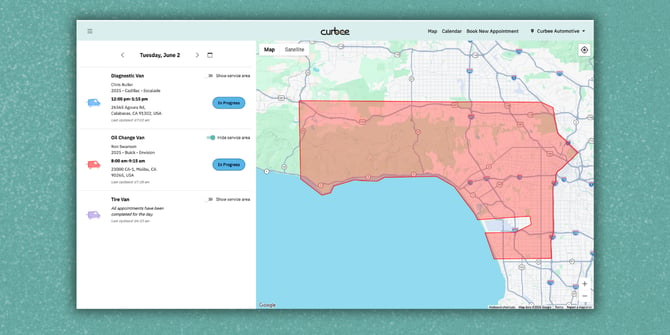
No guessing. No hunting. Just a clearer view of your coverage.
Customers Can Add Appointments to Their Calendar
Mobile service appointments are often booked days, weeks, or even months in advance. And customers are busy. Calendars help.
Now, confirmation emails include Add to Calendar options for Google Calendar, Apple Calendar, Outlook, and other calendar tools. Customers can save the appointment right away and get reminders from the calendar they already use.
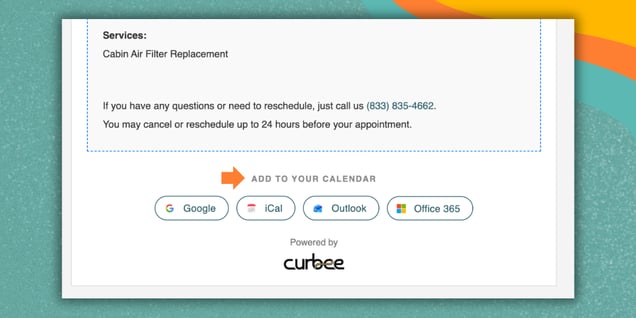
It’s a simple upgrade that helps appointments stay remembered, not buried in an inbox.
Appointment Maps Got More Useful
The appointment confirmation map is no longer just a static image.
Users can now zoom, pan, and switch between Satellite, Map, and Terrain views while reviewing an appointment location.
.png?width=566&height=424&name=Product%20Updates%20%20June%202026%20(4).png)
That means more context before the appointment is finalized — whether your team is checking the exact address, looking at the surrounding area, or adding helpful notes about access, parking, gates, or where the technician should go.
Tiny map. Big help.
Weather Is Now Part of the Scheduling Conversation
Weather can make or break a mobile service day.
Curbee now shows forecast information directly on the Date & Time selection screen during booking. The forecast is based on the customer’s appointment address and updates automatically if the address changes.
Your team can see helpful details like temperature, general conditions, precipitation, wind, humidity, and more.
.png?width=478&height=478&name=Product%20Updates%20%20June%202026%20(2).png)
It won’t block anyone from booking, but it does give teams better visibility so they can plan smarter and avoid avoidable surprises.
Because nobody wants to discover a thunderstorm after the appointment is already on the schedule.
Future Appointments Get an Extra Reminder
As more teams book follow-up service further in advance, customers need a little extra help remembering what’s ahead.
Curbee now sends an automatic reminder email two weeks before eligible appointments. This is in addition to the existing reminder sent the night before the appointment.
That gives customers more time to remember, prepare, or reschedule if needed — and gives your team a better shot at keeping the day running smoothly.
Built for Our Partners
Together, these updates are designed to make mobile service feel more connected from start to finish.
Customers get better communication and easier reminders.
Technicians get more tools in the field.
Dealership teams get more visibility into appointments, service areas, locations, and weather.
It all adds up to a smoother experience before, during, and after every mobile service visit.
And that’s exactly what Curbee is here to help dealerships do: deliver mobile service that feels easy, modern, and on the move.
Curbee is the No. 1 mobile service platform for dealerships, powering mobile and remote service for leading OEMs and dealer groups nationwide. See the ROI for your store · Read The16 report · Book a demo.
.png?width=1536&height=1024&name=How%20Ewing%20Automotive%20Group%20grew%20its%20service%20business%20without%20pouring%20a%20single%20foundation%20(2).png)